

I spent a bit over $1,700 in a month talking to a robot. Then I found out I only paid a hundred. The gap is the whole story, and most of it is plumbing you set once and forget.

Last week I ran a small script that adds up what I spend inside Claude Code, the AI coding tool I live in. The number came back at a bit over $1,700 for the month. About eighty dollars on the days I actually used it. I am a documentation manager, not an engineer, so my first instinct was guilt. Maybe I should just use it less.
That instinct is wrong. It took me a while to see why. A token is the unit an AI charges by. Every word you send it and every word it sends back has a price. The obvious way to spend less is to type less and ask for less. But that is willpower, and willpower fails by Wednesday. The thing that actually works is plumbing. You install a few valves in the pipe, set them once, and they keep saving while you forget they are there. I have five, plus two that were free the whole time.
The valve on every command
The first one sits on every command the AI runs. Claude Code does real work in my terminal. It lists files, searches code, reads documents. Each one dumps its output back into the conversation, and that output is tokens I pay for. So I switched on a small hook called RTK in front of all of it. Before any command runs, RTK quietly rewrites it to a leaner version and trims the noise out of the result.
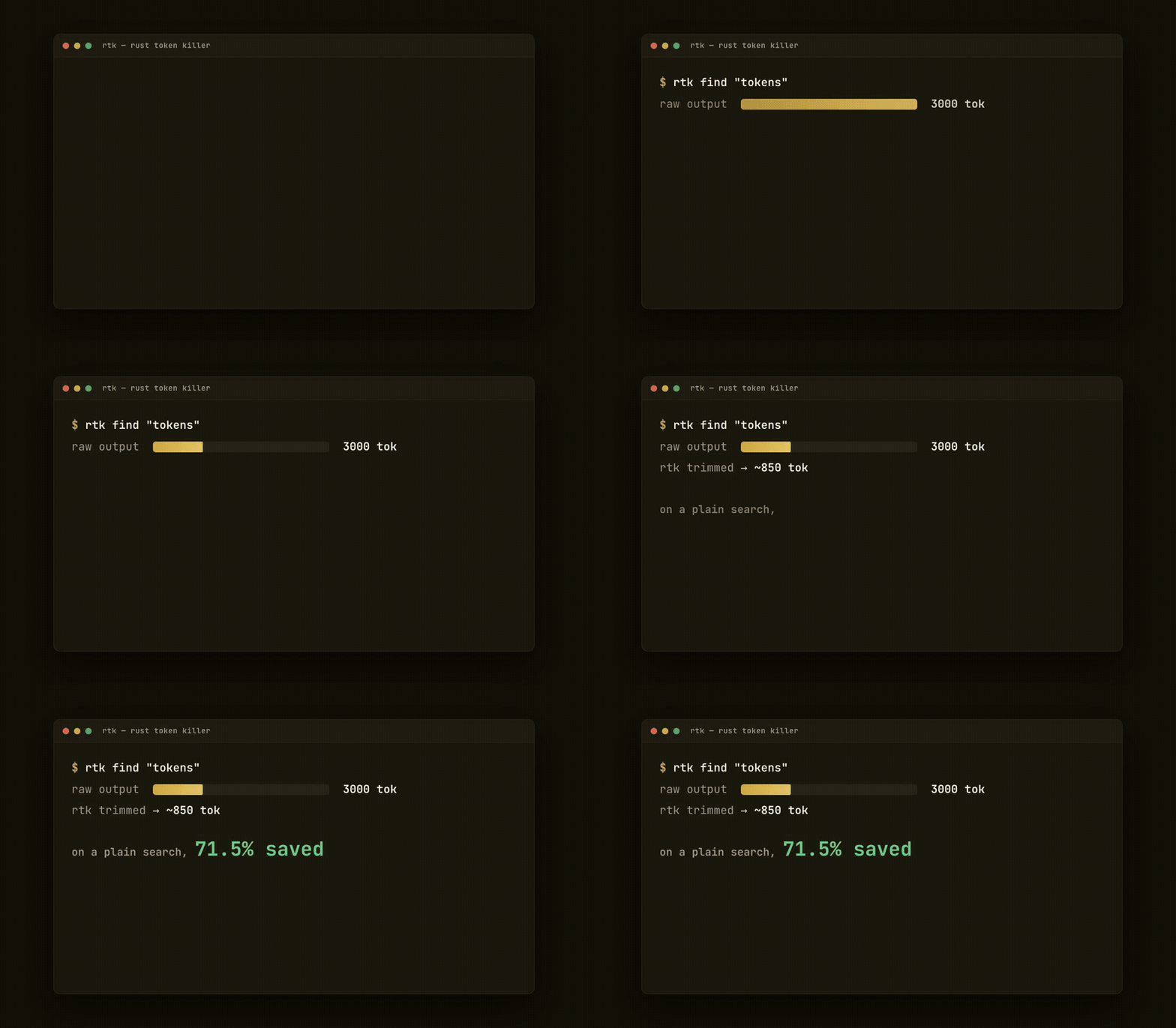
A raw file search might hand back three thousand tokens of paths I will never read. RTK returns the same answer in about a third of that. On a plain search it cuts more than seventy percent. I did not change a thing about how I work. A single line in a config file does the work for me, on every command, forever.
Cutting the padding out of the reply
The second valve points the other way, at what the AI says back. I keep a mode switched on called caveman that strips replies down to the bone. No “I would be happy to help,” no throat-clearing, no three sentences where one fragment will do. The substance stays. The padding dies. If you have ever watched an AI write a whole paragraph to say “yes,” you know how much there is to cut. The answer lands shorter, the bill lands smaller, and honestly I read faster too.
Next to it runs a third persona named ponytail. It makes the AI behave like a tired senior developer who got paged at 3am and wants to write as little code as possible. Fewer lines generated means fewer tokens generated. But here is the part I did not expect. The laziest correct solution is usually the one I can actually maintain. Saving money and getting cleaner work turned out to be the same lever.
You do not save tokens by thinking smaller. You install a valve and forget it exists.
The menu nobody caps
The fourth one I am quietly proud of, because almost nobody talks about it. Every session loads a menu of the tools and skills the AI can reach, and that menu costs tokens before I have asked for a single thing. Mine had grown long, dozens of skills deep. So I capped it. One setting tells Claude Code to spend no more than two percent of its budget describing that menu on the way in.

The skills are all still there. They just stop reciting themselves at length every time I open a session. It is the difference between a waiter reading you the entire menu and one handing you a card. Same kitchen, far less talking.
The valve on the way in
The fifth one I almost forgot I had, which is the point. When I reference a heavy file, a PDF, a slide deck, a spreadsheet, a hook called markitdown catches it before it ever reaches the model. It converts the thing to clean markdown and quietly tells the AI to read that instead of the raw binary.

RTK is a valve on what comes back. This is a valve on what goes in. A forty page PDF is enormous in its native form and small as plain markdown, and I never lift a finger. The file shows up already converted, every time.
The tools I don’t load
Claude Code can reach a whole shelf of outside tools through something called MCP. A browser driver, a design app, a support inbox, a chart maker. Each one comes with a manual the AI has to read before it can use it, and those manuals are not small. Load every one up front and they crowd the window before I have typed a word.
So they sit deferred. Connected, listed by name, but their manuals stay on the shelf at almost no cost. The moment I actually need the browser tool, that one manual loads, the call runs, and the result comes back. I pay for the one I reached for, not the forty I did not.

It is the same idea as the menu cap, one floor down. Do not pay to hold a tool you are not using. And here is the cost people forget: when an MCP tool does run, its answer lands in the conversation and stays there, re-read on every later turn. Cheap to keep on the shelf. Not free once you call it.
The valve that was free all along
Here is the one I missed completely, and it turned out to be the biggest. Every time the AI takes a turn, most of what it reads is the same as last turn. The system prompt, the tool definitions, my config, my saved memory. That stable block sits in a cache and gets re-read at about a tenth of full price. I did not install it. It was on the whole time.

So I went looking for the catch, and I found it in my own setup. A couple of my hooks inject a little text into every single prompt. One stamps the current time. Another reminds me about a workflow option. Tiny things. But because they change every turn, they land outside the cached block, and a changing block is never a cache hit. The free valve was leaking, and I was the leak. That is the honest part nobody puts in these posts. The plumbing is only as good as the person who stops poking holes in it.
What each valve actually cuts
I wanted one number for all of it and could not get an honest one, because I never ran a month with the valves off to compare against. So here is the next best thing, measured per valve where I have the data.

The caching bar is the tallest for a reason. The cheapest token is the one you already paid for and get to reuse.
The number that actually matters
Now the part that reframes everything. That script of mine prices every token at the public API rate. By that math I burned about $1,730 in a month. But I do not pay the API rate. I pay a flat hundred dollars for a Claude subscription, the same hundred whether I use it once or all day.
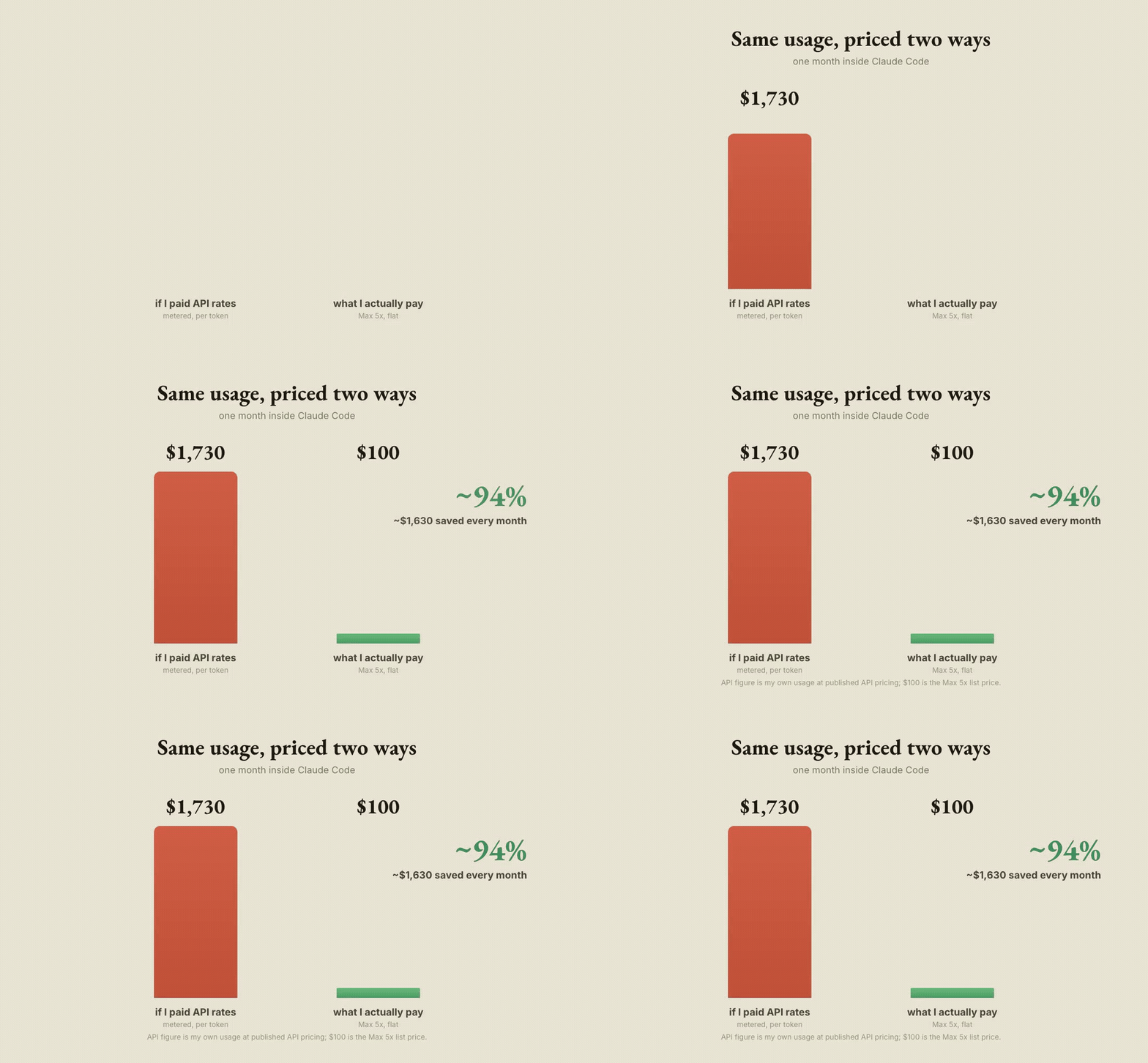
So the valves shave the metered cost, sure. But the subscription is the real lever. Same usage, priced two ways, and the flat plan saves something like ninety four percent against the metered version. The valves are good hygiene. The plan is the bargain.
The honest counterpoint
If I am going to brag about valves, I owe you the leaks too. One setting on my account makes the AI add little teaching asides to its answers. I like them, but they are extra words, which is extra tokens, working directly against caveman and ponytail. The per-prompt reminders I mentioned do the same in miniature. And I run the model on its most thorough setting, which thinks longer and writes more by design.
None of these are mistakes. They are choices, and some of them I will keep. But a post that only lists the savings and hides the spending is selling you something. There is also a tool I reach for by hand called graphify, which turns a whole codebase into a map I can query instead of opening forty files. That one genuinely saves, but it is a move I make, not a valve I forget. Worth knowing the difference.
Measure, then forget
None of the valves are clever on their own. The trick is that I never have to remember any of them. The hooks fire whether I am paying attention or not. The modes stay on across every session. And once a week I run that same little script, see the number, and adjust if it has drifted. That is the entire system. Not “use the AI less.” Measure, install a valve, forget it, check the meter, and now and then go find the hole you punched in your own cache.
! The order matters. Without the weekly number I would never know which valve was working, or that my own hooks were leaking the cached one, and I would be back to guessing and rationing.
The month I started, I was bracing to put myself on a budget. Instead I let the plumbing do the rationing, and the flat plan do the rest. I still ask the AI for everything I want. It just costs a good deal less to want it.
Written from my own Claude Code config, one valve at a time.